# Install by .msi Installer \(Windows\)
The recommended way to install Fluentd on Windows is to use MSI installers of `td-agent`.
## What is `td-agent`?
`td-agent` is a packaged distribution of Fluentd.
* Includes Ruby and other library dependencies \(since most Windows machines don't have them installed\).
* Includes a set of commonly-used 3rd-party plugins such as `out_es`.
* Originally developed by [Treasure Data, Inc](https://www.treasuredata.com/) \(hence the name\).
Currently two versions of `td-agent` are available.
* `td-agent` v4 packages Fluentd 1.11.x \(or later\). This version is recommended.
* `td-agent` v3 packages Fluentd 1.10.x \(or below\).
## Step 1: Install `td-agent`
{% hint style='danger' %}
This article contains deprecated td-agent (EOL) information: SHOULD NOT use td-agent anymore.
* As [Drop schedule announcement about EOL of Treasure Agent (td-agent) 4](https://www.fluentd.org/blog/schedule-for-td-agent-4-eol), recommend to [Upgrade to fluent-package v5](https://www.fluentd.org/blog/upgrade-td-agent-v4-to-v5).
* Package archive was migrated from [packages.treasuredata.com](https://packages.treasuredata.com) to [fluentd.cdn.cncf.io](https://fluentd.cdn.cncf.io/index.html).
{% endhint %}
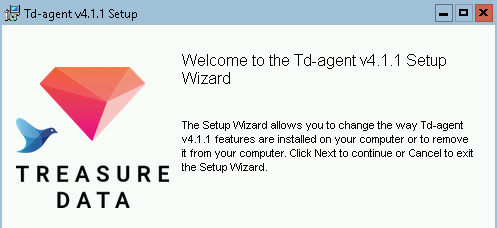
Download the latest MSI installer from [the download page](https://fluentd.cdn.cncf.io/4/windows/index.html). Run the installer and follow the wizard.
Alternatively `td-agent` can be installed with [winget](https://www.microsoft.com/en-us/p/app-installer/9nblggh4nns1):
```text
> winget install td-agent
```
## Step 2: Set up `td-agent.conf`
Open `C:/opt/td-agent/etc/td-agent/td-agent.conf` with a text editor. Replace the configuration with the following content:
```text
@type windows_eventlog2
@id windows_eventlog2
channels application
read_existing_events false
tag winevt.raw
rate_limit 200
@type local
persistent true
path C:\opt\td-agent\winlog.json
@type stdout
```
## Step 3: Launch Td-agent Command Prompt
Open Windows Start menu, and search `Td-agent Command Prompt`. In most environments, the program will be found right under the "Recently Added" section.
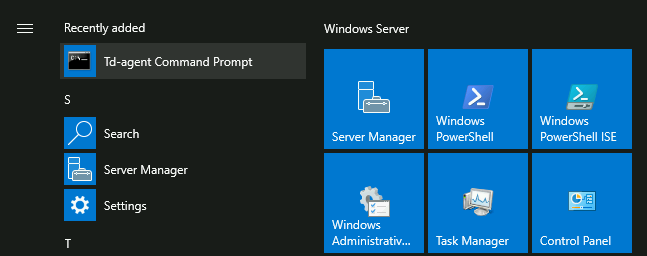
`Td-agent Command Prompt` is basically `cmd.exe`, with a few PATH tweaks for `td-agent` programs. Use this program whenever you need to interact with `td-agent`.
## Step 4: Run `td-agent`
Type the following command into `Td-agent Command Prompt`:
```text
C:\opt\td-agent> td-agent
```
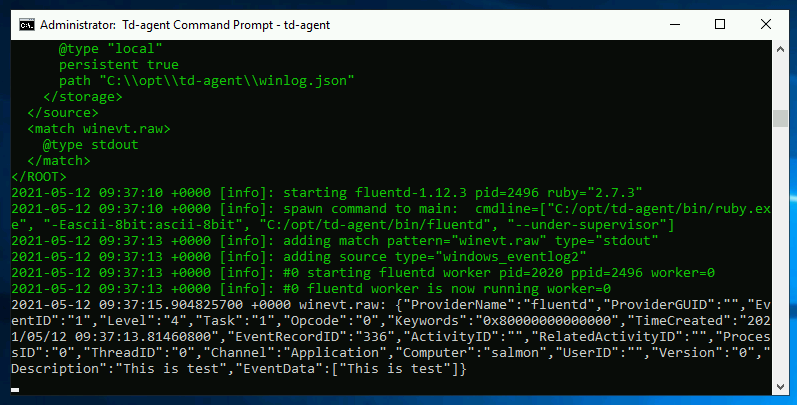
Now `td-agent` starts listening to Windows Eventlog, and will print records to stdout as they occur.
## Step 5: Run `td-agent` as Windows service
Since version 4.0.0, `td-agent` is registered as a Windows service permanently by the msi installer. You can start `td-agent` service manually.
### Using GUI
Please guide yourself to `Control Panel -> System and Security -> Administrative Tools -> Services`, and you'll see `Fluentd Windows Service` is listed.
Please double click `Fluentd Window Service`, and click `Start` button. Then the process will be executed as Windows Service.
### Using `net.exe`
```text
> net start fluentdwinsvc
The Fluentd Windows Service service is starting..
The Fluentd Windows Service service was started successfully.
```
### Using Powershell Cmdlet
```text
PS> Start-Service fluentdwinsvc
```
Note that using `fluentdwinsvc` is needed to start Fluentd service from the command-line. `fluentdwinsvc` is the service name and it should be passed to `net.exe` or `Start-Service` Cmdlet.
The log file will be located at `C:/opt/td-agent/td-agent.log` as we specified in Step 3.
## Step 6: Install Plugins
Open `Td-agent Command Prompt` and use `td-agent-gem` command:
```text
C:\opt\td-agent> td-agent-gem install fluent-plugin-xyz --version=1.2.3
```
## Next Steps
You are now ready to collect real logs with Fluentd. Refer to the following tutorials on how to collect data from various sources:
* Basic Configuration
* [Config File](../configuration/config-file.md)
* Application Logs
* [Ruby](../language-bindings/ruby.md)
* [Java](../language-bindings/java.md)
* [Python](../language-bindings/python.md)
* [PHP](../language-bindings/php.md)
* [Perl](../language-bindings/perl.md)
* [Node.js](../language-bindings/nodejs.md)
* [Scala](../language-bindings/scala.md)
* Examples
* [Store Apache Log into Amazon S3](../how-to-guides/apache-to-s3.md)
* [Store Apache Log into MongoDB](../how-to-guides/apache-to-mongodb.md)
* [Data Collection into HDFS](../how-to-guides/http-to-hdfs.md)
For further steps, follow these:
* [ChangeLog of td-agent](https://docs.treasuredata.com/display/public/PD/The+td-agent+Change+Log)
* [Chef Cookbook](https://github.com/treasure-data/chef-td-agent/)